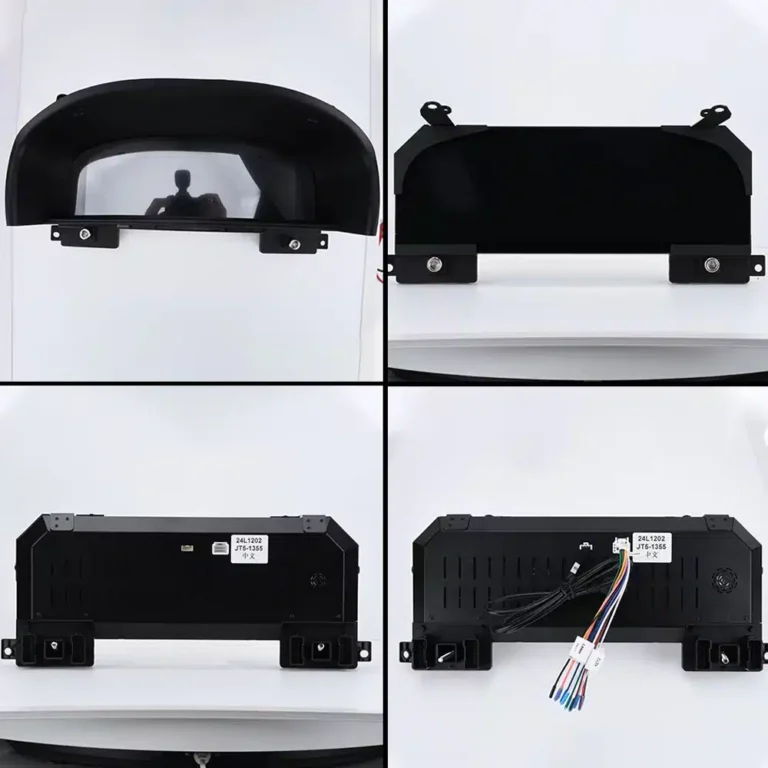
If you drive a Toyota Land Cruiser and the analog gauges feel dated, a Toyota Land Cruiser digital cluster upgrade can modernise the part of the cabin you look at most. This complete guide covers the LC100 (2003–2007), Prado J120 (2004–2009) and LC200 (2008–2020) listings we carry, explains how to match a listing to your truck, shows how to use the new display and gives you a checklist to follow before you order. Everything specific to a listing comes from that listing’s own product page, so always confirm your exact model with us first.
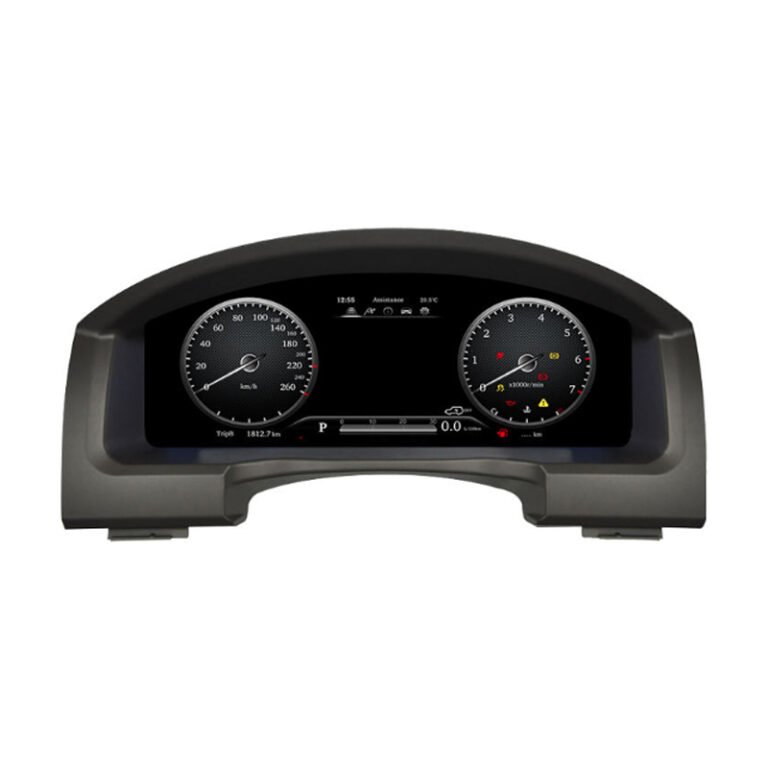
Table of Contents
What a Toyota Land Cruiser digital cluster upgrade changes in your car
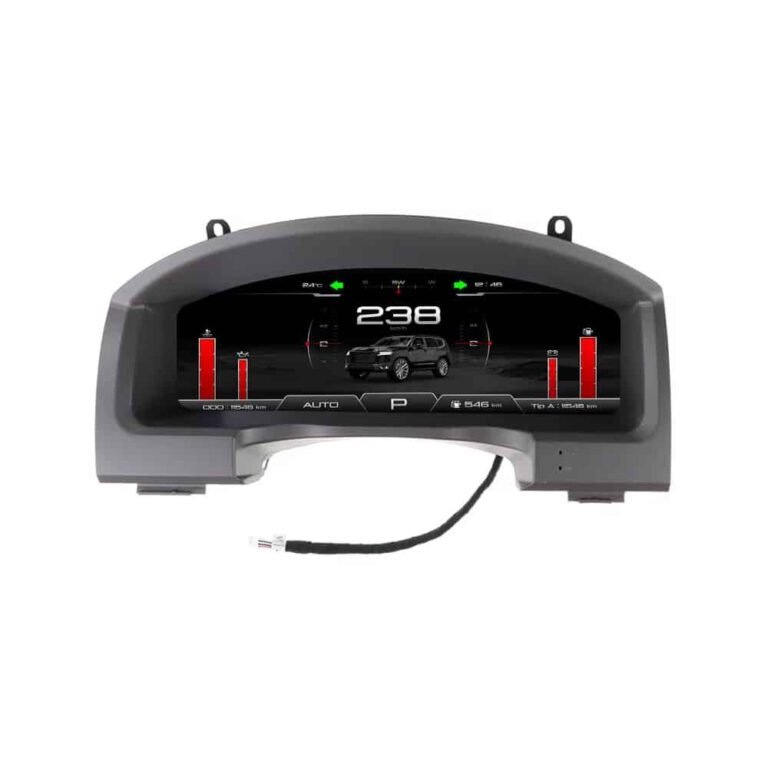
A Toyota Land Cruiser digital cluster upgrade replaces the analog gauges behind the steering wheel with a digital screen. Instead of fixed needles and a small trip display, the driver sees a configurable display that can present speed, engine information, warnings and, on the listings that support it, navigation and smartphone content. The car itself does not change: the engine, the suspension and the safety systems are untouched. What changes is how information is presented to you on every journey.
Owners usually look at this upgrade for three reasons. First, appearance: a wide, sharp screen makes an older Toyota Land Cruiser cabin feel newer. Second, usefulness: navigation and phone features in the driver’s line of sight reduce how often you look across at the centre screen. Third, personalisation: several listings describe multiple gauge themes, so you can pick a layout that suits how you drive. None of these reasons guarantees a better driving experience for everyone, which is why the checklist further down matters.
Which Toyota Land Cruiser digital cluster listings do we offer?
We list digital cluster upgrades for three Land Cruiser generations, plus an Android head unit for the LC200 that is a different kind of product.
- Land Cruiser LC100, 2003–2007: Toyota LC100 digital cluster, listed at 1920×720 resolution, with a plug-and-play description and steering-wheel control notes.
- Land Cruiser Prado J120, 2004–2009: Land Cruiser Prado J120 digital cluster, listed at 1920×720 with CarPlay and map features mentioned.
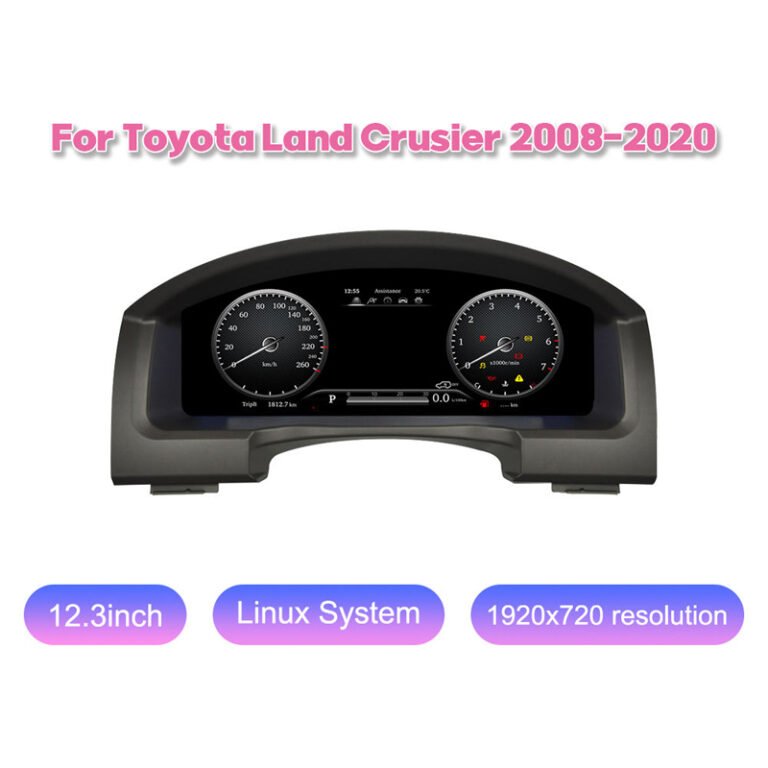
- Land Cruiser LC200, 2008–2020: Toyota LC200 digital cluster, 12.3-inch, which mentions CarPlay and CANBUS data and describes interface theme switching and harness connection.
- Land Cruiser LC200 pre-facelift: Toyota LC200 digital instrument cluster upgrade, with steering-wheel control notes.
- Land Cruiser LC200 head unit: Toyota LC200 Android head unit with a 24.6-inch dual-screen cockpit. This is a head unit with wireless CarPlay and Android Auto mentioned, not a standard instrument cluster, so read its listing before choosing.
Matching a Toyota Land Cruiser digital cluster upgrade to your truck
Start with the generation. The LC100 is the older Land Cruiser, the Prado J120 is the Land Cruiser Prado of the mid-2000s, and the LC200 is the later Land Cruiser sold from 2008. Markets use different names, such as Land Cruiser, Land Cruiser Prado, Lexus LX or GX variants, so match by chassis generation rather than by sales name.
Pre-facelift and facelift LC200
The LC200 listings cover 2008–2020, and one is specifically described for the pre-facelift truck. If you own an LC200, find out whether yours is pre-facelift or facelift before you choose, because the dashboard and connectors can differ. Send us photos if you are unsure.
Check the connectors first
The LC200 listing has a section warning you not to force the installation if certain problems appear, and another about connector mismatch. The advice is simple: if a connector does not line up, stop and contact us rather than forcing it. That is one more reason to confirm your generation and facelift status before ordering.
What the Toyota Land Cruiser digital cluster listings include
The LC100, Prado J120 and LC200 cluster listings describe a 1920×720 display, and the LC200 listing names a 12.3-inch size. That wide screen replaces the original instrument cluster and presents speed, engine information and warnings in a sharper layout that sits directly in your line of sight.
Interface theme switching
The LC200 listing includes a section on UI theme switching and another showing digital cluster interface theme options. That means you can choose how the driver display looks, for example a more traditional layout or a more modern one. The aim is control over presentation, not any change in how the truck drives.
CarPlay and navigation
The Prado J120 and LC200 cluster listings mention CarPlay, and the Prado J120 mentions map features as well. The LC200 head-unit listing mentions wireless CarPlay and Android Auto. Because features vary, read the specific product page for your truck.
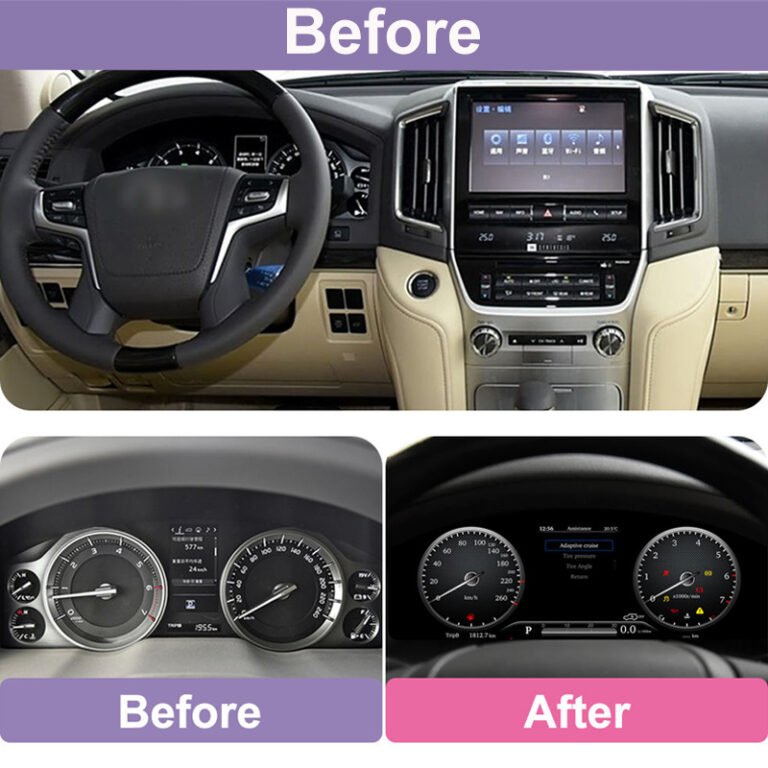
What changes after installation
The LC200 listing explains what changes after installation, and shows before-and-after photos of the product, the installed display from the driver seat and the final installed dashboard fit. If you want to see what the finished result looks like, those photos on the product page are a good starting point.
How to use your Toyota Land Cruiser digital cluster upgrade after installation
Every Toyota Land Cruiser digital cluster upgrade kit ships with its own instructions, so follow the guidance supplied with your unit first. The steps below describe the typical flow for this type of upgrade so you know what to expect.
- Start the car and let the cluster boot. The display should light up with the default theme within a few seconds of switching the ignition on. If the screen stays dark, stop and check the connections or contact support rather than forcing anything.
- Check the basics first. Confirm speed, engine information, fuel level and warning lights look correct before you drive. Compare them with how the original cluster behaved.
- Choose a theme. Where the listing supports multiple gauge themes, switch between them using the controls described in the instructions for your unit, then keep the layout you find easiest to read at a glance.
- Learn the steering-wheel controls. Where steering-wheel control support is listed, practise the buttons while parked so you know which one changes views or confirms a selection.
- Connect your phone, if your kit supports it. Where a listing mentions Apple CarPlay or Android Auto, connect your phone following the kit’s pairing steps. You can read more about each system on the official Apple CarPlay page and the Android Auto page.
- Test navigation and maps where supported. Start a route in your phone’s map app and confirm the directions appear where the listing says they should.
- Keep notes. Write down any differences you notice, such as a warning that does not appear. That information helps us support you quickly.
For the LC200 listing, the theme options are described on the product page, so look at them before you drive and choose the layout you find easiest to read. Where a listing does not mention a feature, do not assume it is included.
Toyota Land Cruiser digital cluster upgrade: installation overview
A cluster replacement involves removing dashboard trim, unplugging the original cluster, connecting the new unit with its harness and testing before you refit the trim. The LC200 listing describes a harness connection step and warns not to force the installation if problems appear, including connector mismatch. The older listings describe plug-and-play approaches. Because Land Cruisers vary by market and year, confirm the details with us before you start.
Plan your Toyota Land Cruiser digital cluster upgrade installation carefully. Do not force a connector that does not match, do not skip the pre-reassembly test, and keep the original cluster in a safe place. If you are not experienced with car electronics, a qualified installer is the safer choice. Ask us what your specific listing recommends before you order.
Before you order: Toyota Land Cruiser digital cluster upgrade checklist
- Confirm your generation: LC100, Prado J120 or LC200.
- For the LC200, confirm whether yours is pre-facelift or facelift.
- Confirm your model year and market.
- Check left-hand or right-hand drive and steering-wheel controls.
- Read the specific listing for screen size and features.
- Decide whether you want a cluster or the LC200 Android head unit, which is a different product.
- Check the connectors on your dashboard before you start, and stop if they do not match.
- Send us photos of your dashboard if you are unsure.
Common mistakes with a Toyota Land Cruiser digital cluster upgrade
- Choosing by year alone. Years overlap between generations, trims and markets, so always confirm the generation and the original cluster type.
- Skipping the head-unit check. Features such as navigation and phone display can depend on the head unit in your car.
- Assuming every listing has the same features. Read the specific product page, because CarPlay, Android Auto and other options vary between listings.
- Ordering before asking. A short message with your vehicle details costs nothing and avoids returns.
- Rushing the installation. Test the unit before refitting trim.
Care and troubleshooting for your Toyota Land Cruiser digital cluster upgrade
Treat the new screen like any other dashboard display: clean it with a soft, slightly damp cloth, avoid harsh chemicals and keep it out of direct heat where possible. If something does not behave as expected after installation, note what you see, check the connectors and the pre-reassembly test, and then contact us with your vehicle details and photos. We will help you work out whether it is a setup question or something to return.
Is a Toyota Land Cruiser digital cluster upgrade worth it?
Whether a Toyota Land Cruiser digital cluster upgrade is worth it depends on how you use your car. If you value a modern display, in-view navigation where the listing supports it and the chance to personalise the layout, the upgrade can be a satisfying change. If your priority is a factory-original look or zero installation work, consider whether the trade-offs suit you. Either way, the best Toyota Land Cruiser digital cluster upgrade is the one that matches your generation, year and head unit exactly, so confirm those details before you order.
Frequently asked questions about the Toyota Land Cruiser digital cluster upgrade
Does the Toyota Land Cruiser digital cluster upgrade fit the LC200?
Yes. Listings cover the LC200 for 2008–2020, including one for the pre-facelift truck. Confirm your facelift status with us before ordering.
Is there a version for the LC100?
Yes. A listing covers the Land Cruiser LC100 for 2003–2007.
What about the Prado J120?
A listing covers the Land Cruiser Prado J120 for 2004–2009.
What is the LC200 Android head unit?
It is a head unit with a 24.6-inch dual-screen cockpit and wireless CarPlay and Android Auto mentioned. It is a different product from a standard instrument cluster.
Can I switch the display theme?
The LC200 listing describes interface theme switching and shows theme options. Check the product page for details.
What if a connector does not match?
The LC200 listing says not to force the installation. Stop and contact us with photos so we can help.
Can I install it myself?
The work involves removing trim and connecting a harness. Ask us whether it suits your truck, or use a qualified installer.
How long does shipping take?
We ship worldwide from Texas. See Shipping & Returns for estimates; they are not guarantees.
Shipping, returns and support
We ship from Texas City, Texas, to customers worldwide. Orders under $300 ship for a flat $50 and orders of $300 or more ship free. Delivery estimates and customs information are on the Shipping & Returns page, and international customers can read International Orders. If your Toyota Land Cruiser digital cluster upgrade does not fit, we replace it or refund it under the return rules described there. For fitment help, send us your vehicle details.
Related guides
- Mercedes C-Class digital cluster upgrade
- BMW 5 Series digital cluster upgrade
- Digital instrument cluster hub
- Digital Instrument Cluster Upgrade: What to Check Before You Buy