


Description
Audi Q5 8R 2009–2017 · 12.3-inch Digital Cluster
Audi Q5 Digital Instrument Cluster Upgrade for a Cleaner OEM-Style Cockpit
Give your Audi Q5 8R a sharper virtual-cockpit style driver display with a 12.3-inch IPS screen, supported original vehicle information and a vehicle-specific installation route prepared around your Q5 configuration.
- Vehicle-specific fitment for Audi Q5 Typ 8R 2009–2017
- 12.3-inch 1920×720 IPS display for a much more modern driver view
- Supported steering-wheel controls, vehicle data and warning information retained
- LHD and RHD preparation supported with matched vehicle details
12.3-inch IPS A larger digital viewing area.
1920×720 Sharper gauges, maps and data.
Linux System Stable instrument-cluster operation.
Original Controls Keeps supported familiar operation.
Matched Q5 Wiring Prepared for the confirmed vehicle.
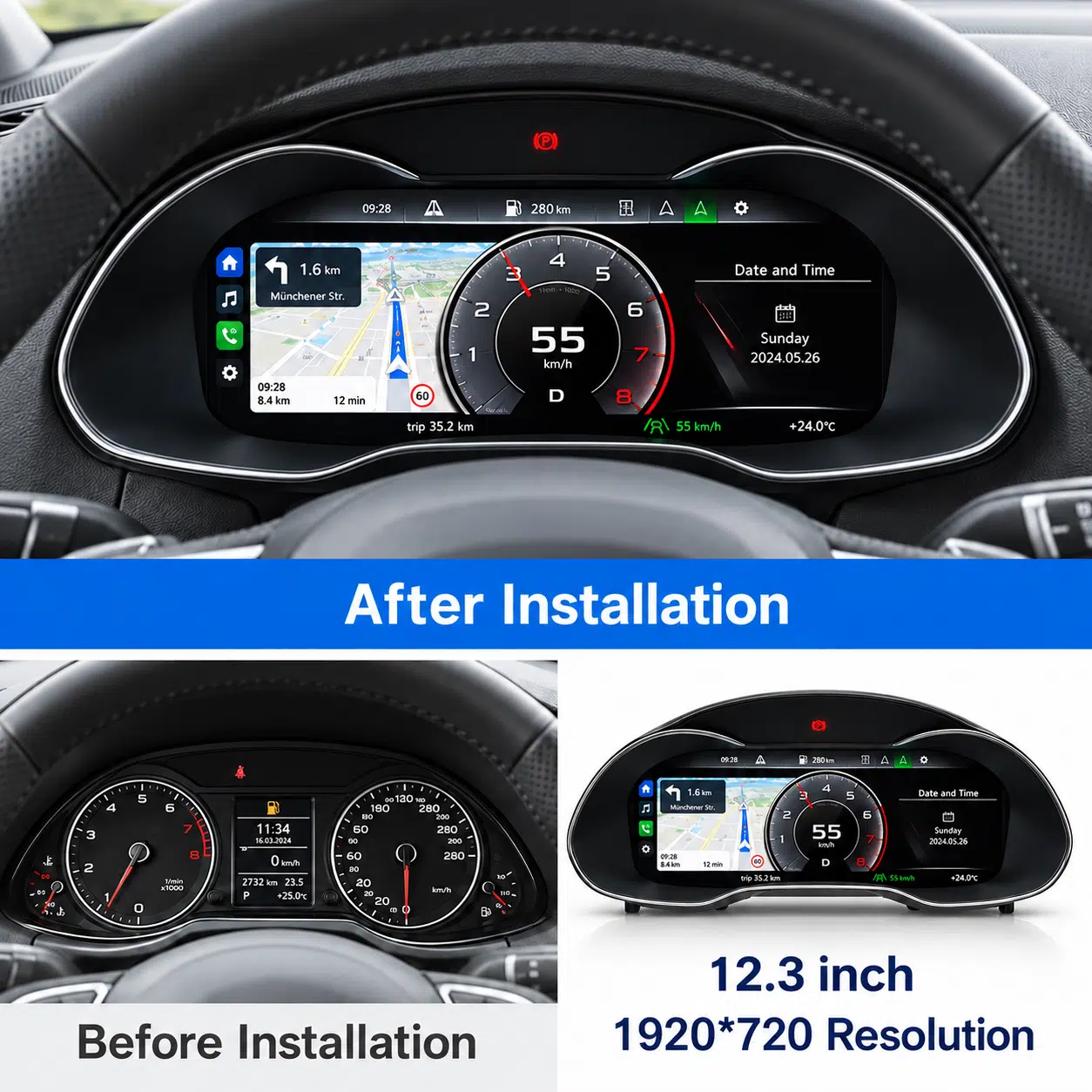
Installed Q5 driver view: navigation, gauges and supported vehicle information stay directly in front of the driver.
Make the Audi Q5 8R Cockpit Feel Noticeably Newer Every Day
This Audi Q5 digital instrument cluster changes the part of the cabin you see on every drive. The larger digital display gives speed, RPM, supported navigation, warning information and vehicle data a cleaner visual center while preserving the driver-focused position of the original Q5 dashboard.
Information Where You Look
Important driving information stays in the natural driver sightline, making the upgraded cockpit easier to read in normal daily use.
Modern 12.3-inch Display
The 1920×720 IPS screen gives the older Q5 cabin a sharper and more current visual focus without changing the whole dashboard.
Original Control Feel
Supported steering-wheel operation and vehicle information remain part of the driving experience, helping the upgrade feel integrated rather than separate.
12.3-inch Cluster Hardware Made for the Q5 Dashboard
The cluster body follows the Audi Q5 8R instrument area, giving the upgrade a more integrated physical presence than a generic add-on display.
Core Driving Experience
Real Q5 Digital Cluster Views Show the Upgrade in Daily Use
The strongest reason to upgrade is not a specification list—it is how the display changes the driver view. These real product visuals show navigation, installed positioning and familiar gauge layouts inside the Audi-style cockpit.
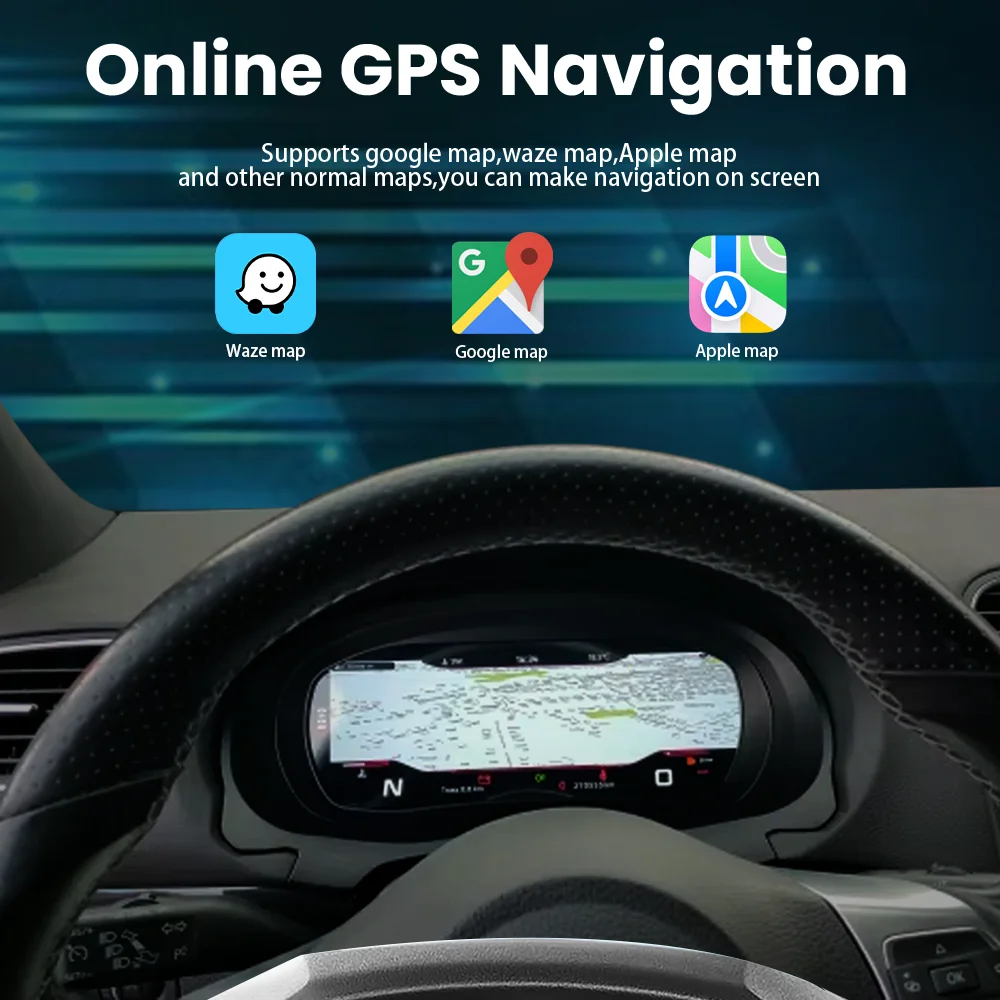
Can the Audi Q5 Digital Cluster Show Navigation in the Driver’s Sightline?
Yes. Supported map display can place route information directly in front of the driver, reducing the need to keep looking toward a center screen for navigation.
Navigation Driver Sightline
Installed View with the Original Audi Driving Position
The display sits behind the steering wheel where the factory cluster belongs, keeping the upgrade visually connected to the original driver-focused cabin layout.
Steering-Wheel Controls Digital Gauges
Driver-Centered Information Placement
Speed, warnings and supported driving information remain positioned where the driver naturally looks, improving the usefulness of the display every time the Q5 is driven.
Direct View Driving Data
Audi Q5 8R Fitment
Will This Audi Q5 Digital Instrument Cluster Fit My Q5 8R 2009–2017?
Audi Q5 8R / First-Generation Q5
The primary fitment is Audi Q5 Typ 8R, commonly searched as Q5 8R, Q5 Mk1 or first-generation Q5.
What About the 2018+ Audi Q5 FY / 80A Generation?
Common market names: Audi Q5 2.0 TFSI, 3.2 FSI, 3.0 TFSI, 2.0 TDI, 3.0 TDI and quattro variants are all names seen within the Q5 8R generation. The original cluster and dashboard configuration remain the final reference used to prepare the correct Motoway Upgrade version.
Audi Q5 8R Screen Size and Fitment Reference
The existing fitment graphic reinforces the main product boundary: a 12.3-inch 1920×720 digital cluster prepared for the supported Audi Q5 8R route.
Will Original Audi Q5 Mileage, Vehicle Data and Steering-Wheel Controls Be Retained?
Yes, the supported Q5 8R retrofit route is built around retaining the original vehicle-data logic and familiar control experience. The original electronics transfer and matched vehicle interface allow the upgraded display to continue using supported mileage, fuel, warning and driving information rather than functioning as a standalone decorative screen.
Steering-Wheel Controls
Supported original steering-wheel buttons continue to control the cluster interface after the matched connection and correct setup.
Driving Data
Speed, RPM, fuel level, coolant temperature, trip mileage and related supported driving information remain available.
Factory Wiring Protection
The matched harness is designed around the supported factory connection path without intentional cutting of the main vehicle wiring.
Original Board Transfer Keeps Vehicle Information Logic Connected
The Q5 8R retrofit route uses the required original electronics transfer so the new screen can continue working with the vehicle’s existing mileage, fuel, warning and information logic.
Original Electronics Vehicle Data
How Is the Audi Q5 8R Digital Instrument Cluster Installed?
Remove the Original Cluster
Remove the relevant trim and factory mechanical cluster so the original components and replacement assembly can be prepared correctly.
Transfer the Required Original Electronics
Move the required original board/electronics into the digital-cluster assembly to preserve the supported original vehicle-data logic.
Connect the Matched Harness
Connect the prepared Q5 wiring and vehicle interface using the no-cut supported factory connection route.
Configure and Test
Set the correct vehicle protocol, language, units and display mode, then confirm the supported functions before final reassembly.
More Real Functions That Make the Q5 Digital Cluster Useful After the Visual Upgrade
The main transformation is the new digital driver view, but the current product visuals also show the functions that make the cluster practical over time: language support, vehicle-status information, multiple layouts, color adjustment, screen synchronization, eye-comfort features and stable Linux-based operation.
Multi-Language Interface for International Q5 Owners
Multiple interface languages make the cluster easier to use across major markets, helping the menus feel natural after installation.
Multi-Language UI
Vehicle Status and Maintenance Information Stay Useful
Vehicle Status
Single and Double Dial Display Options
Single / Dual Dial
Display Color Personalization
Supported color settings let you adjust the cockpit mood while keeping the overall Audi dashboard restrained and driver-focused.
Color Settings
Driver-Focused Installation Effect Across the Audi-Style Cluster Family
The installation-effect reference shows the same core idea behind the Q5 upgrade: replace the original instrument area with a wide digital display while keeping the screen directly in the driver’s field of view.
Multiple UI Themes for Different Driving Habits
Classic, comfortable and sport-style themes let the driver choose a look that suits the journey instead of being locked into one gauge design.
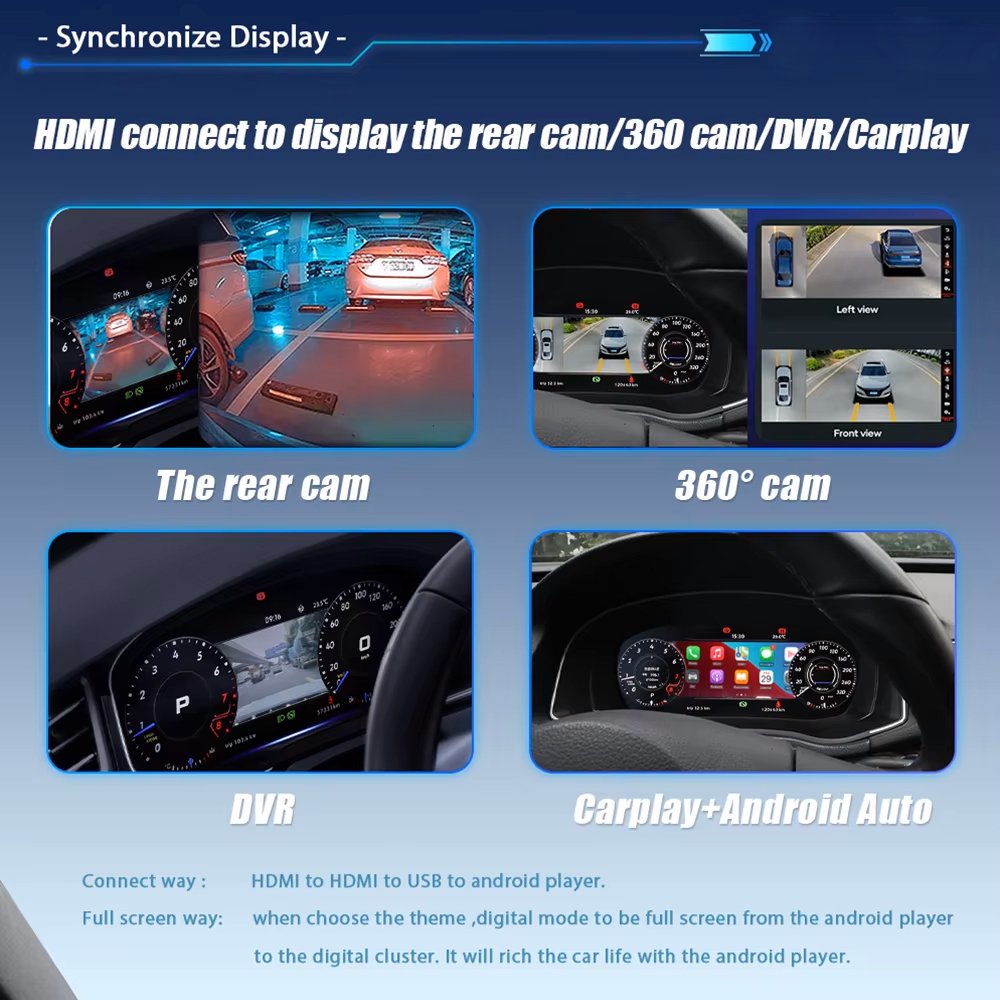
Can Camera, CarPlay or Android Auto Content Be Synchronized to the Cluster?
Yes, with the correct cable and compatible source system. Supported rear camera, 360 camera, DVR, CarPlay or Android Auto display content can be synchronized so more useful information reaches the driver display.
Camera CarPlay / Android Auto
Nine Daily-Use Technologies Work Together in One Driver Display
The function overview combines HD display, screen synchronization, supported original vehicle information, steering-wheel operation and real-time driving data into one instrument-cluster experience.
Multiple View Modes Put Different Information First
Classic, navigation, economy, driving-assistance and sport-style modes let the driver choose the layout that best fits the way the Q5 is being used.
Compatible Vehicle Information Remains Part of the Display
Supported speed, fuel, lamp status, tire-pressure information, cruise information and other available driver data can be presented through the cluster interface.
Comfortable Night Reading for Longer Drives
Anti-glare and eye-comfort display design help the digital cluster remain easier to read during night driving and longer journeys.
Eye Comfort
Color Adjustment Helps Fine-Tune the Cockpit Mood
Personalized color adjustment lets you soften or sharpen the instrument look without changing the physical dashboard layout.
Wireless Screen Projection Adds Another Display Option
Supported wireless screen projection lets compatible mobile content appear on the cluster display when the correct configuration is used.
Wireless Projection
Stable Linux-Based Cluster Operation
The lightweight Linux system is designed for fast start-up and stable everyday instrument-cluster use.
Linux Fast Start
Specifications / Product Parameters
Audi Q5 Digital Instrument Cluster 2009–2017 Specifications
These parameters confirm the core hardware and operating specification for the current Q5 8R cluster listing.
12.3-inch IPS Large digital driver display
1920×720 HD dashboard resolution
Linux System Instrument-cluster platform
-30°C to +85°C Listed operating range
Multi-language UI Multiple supported languages
Product
Audi Q5 Virtual Cockpit Cluster
Vehicle
Audi Q5 Typ 8R / first-generation Q5
Years
2009–2017
SKU
YB-125
Display Size
12.3-inch
Panel Type
IPS
Resolution
1920×720
System
Linux
Start-up Time
Refresh / Response
60Hz / <5ms
Operating Temperature
-30°C to +85°C
Power Input
12V DC / 3A Max
Interface Languages
Multi-language UI including English, Spanish, German, French and other supported languages
Listed Package Weight
2.5kg


Reviews
There are no reviews yet.