





Description
BMW X3 F25 · 2011–2017 · 12.3″ IPS
BMW X3 F25 Digital Cluster with CarPlay & Android Auto
Replace the dated analog instrument panel with a vehicle-specific 12.3-inch digital cockpit that combines a 1920×720 IPS display, fast Linux startup, Apple CarPlay, Android Auto and the BMW driving information you still need every day.
- Apple CarPlay + Android Auto support
- 12.3″ IPS · 1920×720 resolution
- Approx. 2-second Linux startup
- Retains supported BMW driving data & warnings
- Original steering-wheel controls remain supported
- OEM-style connector route without intentional wire cutting
CarPlay Phone integration
Android Auto Navigation & apps
12.3″ IPS 1920×720
Fast Boot Approx. 2 sec
BMW Data Core vehicle info
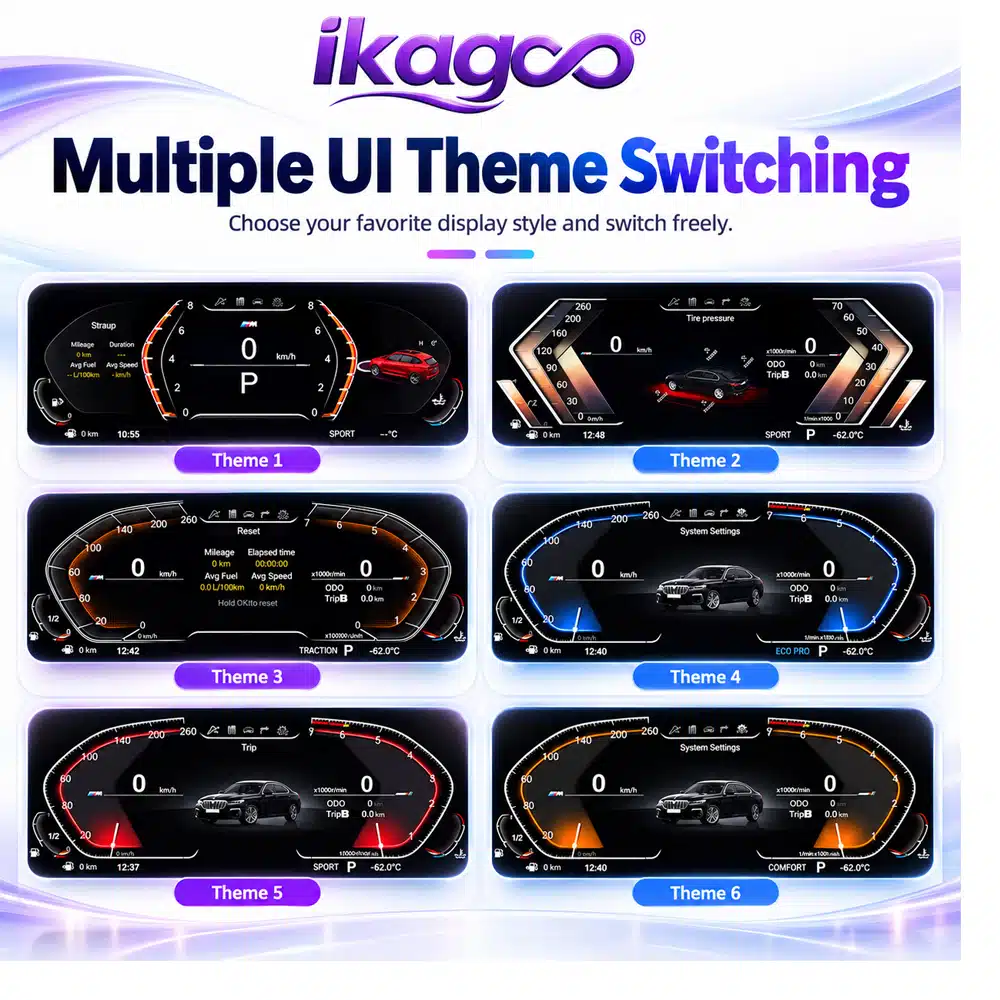
Multi-Theme Switchable UI
Modern display plus phone integration changes both appearance and daily use.
Strong Retention Route
Supported BMW data, warnings and steering controls remain part of the upgrade.
Advanced DIY / Pro-Friendly
Matched connectors reduce modification, but cluster removal and testing still matter.
Why the BMW X3 F25 Digital Cluster Is Worth the Upgrade
The main reason to upgrade is not simply to replace analog needles with a screen. This BMW X3 F25 digital cluster makes the part of the cabin you look at on every drive feel newer while adding phone connectivity and clearer digital information.
A bigger change than cosmetic trim
The 12.3-inch IPS panel replaces the old gauge presentation with a full digital cockpit, so the visual improvement is noticeable every time you start the car.
CarPlay and Android Auto add daily value
Phone-based navigation and compatible mobile functions become part of the upgraded driver display experience instead of the product being only a new gauge skin.
Vehicle-specific instead of universal
The cluster follows the BMW F-chassis instrument position and a matched connector route, reducing the compromises of adding a generic external screen.
BMW X3 F25 Digital Cluster Features You Will Actually Use
Apple CarPlay & Android Auto in the Digital Cockpit
Yes — this BMW X3 F25 digital cluster supports Apple CarPlay and Android Auto. It gives the upgrade practical value beyond a new instrument theme by bringing compatible phone navigation and mobile functions into the cockpit display experience.
Why it matters: you are upgrading both the look of the instrument panel and the way you use navigation and phone-connected functions during daily driving.
Multiple UI Themes Keep the Cabin Feeling Fresh
The cluster provides multiple switchable display themes so you can change the visual style without replacing hardware. The available interfaces retain the BMW-oriented digital cockpit look while giving the cabin a more current appearance.
Why it matters: a long-term cockpit upgrade should not feel visually fixed to one theme from the day you install it.
Linux-Based System with Approx. 2-Second Startup
The purpose-built Linux platform is listed with an approximately 2-second startup time. The cluster is designed to be ready quickly when the vehicle starts rather than behaving like a general-purpose tablet that needs a long boot cycle.
Why it matters: an instrument cluster should feel like part of the car — available quickly and focused on the driver information you need.
Will This BMW X3 F25 Digital Cluster Fit My 2011–2017 X3?
Core fitment
BMW X3 F25 SUV · 2011–2017.
Factory HUD
Vehicles with OEM head-up display require the HUD-compatible cluster version.
Hybrid models
Hybrid variants are not supported by this version.
| Chassis | Model | Body | Listed Years |
|---|---|---|---|
| F25 | BMW X3 | SUV | 2011–2017 |
| F26 | BMW X4 | Sports Activity Coupé | 2014–2018 |
| F07 | BMW 5 Series | Gran Turismo | 2009–2016 |
| F10 / F11 / F18 | BMW 5 Series | Sedan / Touring / Long-wheelbase | 2010–2017 |
| F06 / F12 / F13 | BMW 6 Series | Gran Coupé / Coupé / Convertible | 2011–2017 |
| F01 / F02 / F03 | BMW 7 Series | Sedan | 2009–2015 |
| F15 | BMW X5 | SUV | 2014–2017 |
| F16 | BMW X6 | Sports Activity Coupé | 2014–2017 |
For the BMW X3 F25 order, provide the exact model year, whether the car has factory HUD, and the iDrive system version (CIC / NBT / EVO) or VIN when requested. China-market naming for this generation is commonly 宝马X3(进口).
What Original BMW Information Remains After the F25 Digital Cluster Upgrade?
The supported route keeps the core information that makes the original instrument cluster useful. The exact display presentation changes, but the product is designed around the BMW vehicle-data route rather than functioning as a disconnected screen.
Driving information
- Vehicle speed and engine RPM
- Fuel level and coolant temperature
- Gear position
- Mileage and trip data
- Fuel consumption and driving range
Warnings & controls
- Warning-light information
- Door-open alerts
- Service reminder information
- Tire-pressure / vehicle-status data where the car provides it
- Original steering-wheel controls remain supported
How Is the BMW X3 F25 Digital Cluster Installed?
The intended route is a direct replacement using OEM-style connectors without deliberately cutting the factory main wiring. “Plug & Play” describes the matched connector approach; it does not mean the dashboard requires no disassembly, system matching or final function testing.
1 Confirm the vehicle
2 Remove the original cluster
Open the instrument area carefully and protect trim, clips and factory connectors.
3 Connect the matched route
4 Power on & verify
Check speed, RPM, gear, fuel, warnings, steering controls and phone functions before closing the dash.
5 Final reassembly
Complete trim reassembly only after the main cluster and retained functions behave correctly.
Professional installation by an experienced automotive-electronics technician is recommended if you are not already comfortable removing BMW interior trim and testing vehicle electronics.
More Everyday Value from the BMW X3 F25 Virtual Cockpit
Clearer day-to-day driver display
The IPS panel gives the F25 a wider, cleaner digital presentation for speed, RPM, gear position, fuel and warning information. The result is a cockpit that feels significantly newer without changing the entire dashboard architecture.
Multiple languages for international owners
The product supports multiple interface languages, making the cluster easier to configure for different markets and drivers while keeping the main vehicle information visible in one digital display.
Installed Appearance: Keep the X3, Change the Part That Feels Old
The dashboard stays recognizably BMW X3 F25, while the analog instrument area becomes a wide digital cockpit instead of looking like an external tablet added to the cabin.
BMW X3 F25 Digital Instrument Cluster Specifications
The key specification is the combination of a 12.3-inch 1920×720 IPS display, Linux platform and supported phone connectivity in a vehicle-specific BMW cluster format.
| Product type | Vehicle-specific digital instrument cluster / virtual cockpit retrofit |
|---|---|
| Primary vehicle | BMW X3 F25 |
| Supported years | 2011–2017 |
| Screen | 12.3″ IPS LCD |
| Resolution | 1920 × 720 |
| System | Linux |
| Boot time | Approx. 2 seconds |
| Phone connectivity | Apple CarPlay + Android Auto support |
| UI themes | Multiple switchable display themes |
| Languages | Multiple languages |
| Vehicle information | Speed, RPM, fuel, coolant temperature, gear, mileage, trip, consumption, range and supported warning/status data |
| Steering controls | Original steering-wheel controls remain supported on the matched route |
| Installation route | OEM-style matched connectors; no intentional cutting of supported factory main wiring |
| Factory HUD | HUD-equipped vehicles require the HUD-compatible version |
| Hybrid models | Not supported by this version |
| Package size | 39 × 28 × 20 cm (reference) |
| Weight | Approx. 2.0 kg net / 3.5 kg gross (reference) |
A Strong Upgrade for an X3 F25 You Still Want to Keep
If your 2011–2017 BMW X3 F25 still fits your life but the analog instrument panel makes the cabin feel older than the rest of the vehicle, this 12.3-inch digital cluster is a high-value cockpit upgrade. It combines the modern screen you can see every day with CarPlay, Android Auto, retained BMW driving information and a vehicle-specific installation route.


Reviews
There are no reviews yet.