




Description
Toyota Alphard 20 Series · Full LCD Instrument Cluster
Make the Driver’s Display Feel Modern Again
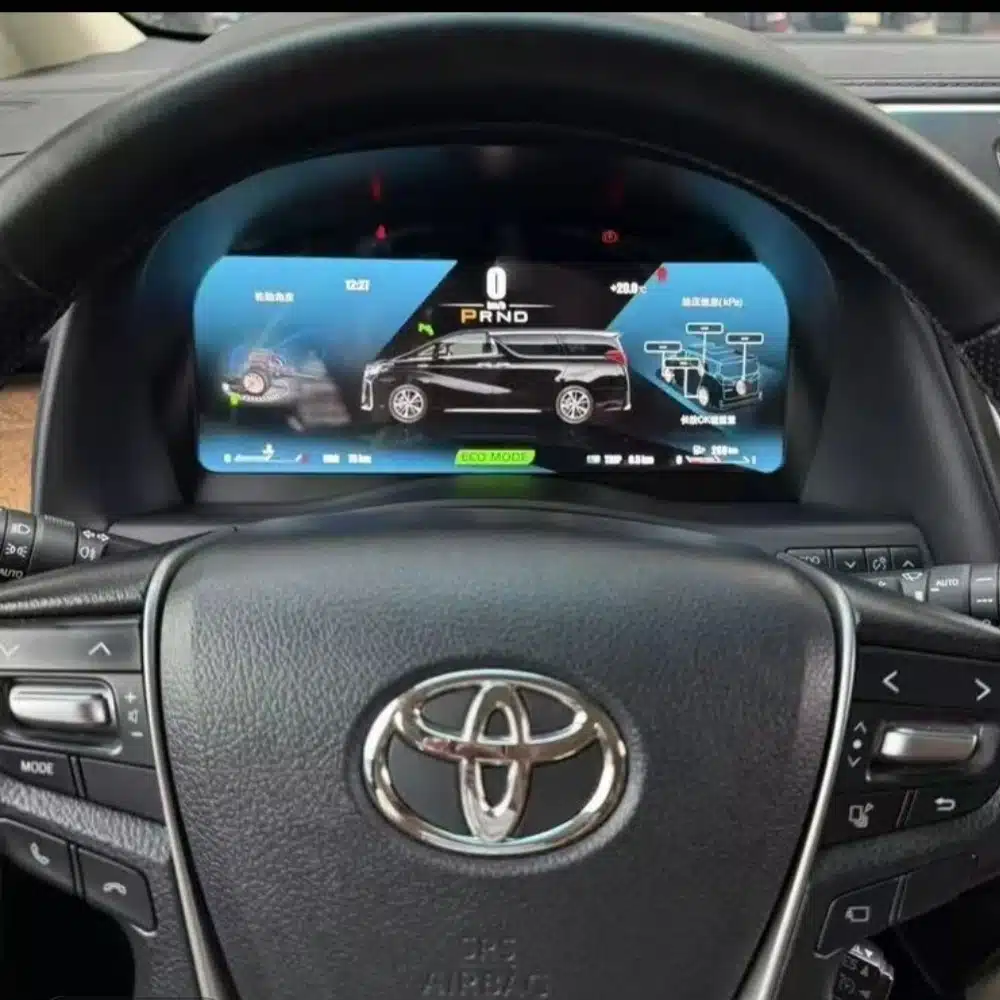
The Toyota Alphard 20 Series digital cluster replaces the original gauge assembly with a 12.3-inch, 1920×720 Linux LCD display. It gives you a clearer digital view of speed, RPM, gear position, fuel information, temperature, mileage and supported vehicle warnings while keeping the dashboard layout integrated with the vehicle.
12.3-inch LCD 1920×720 Linux System Original Vehicle Data Steering Controls Matched Wiring
Quick Answer
This product is a vehicle-specific full-LCD instrument cluster for the Toyota Alphard 20 Series, generally associated with the second-generation dashboard introduced from 2008 until the 2015 model transition. It replaces the original instrument assembly and displays supported driving and vehicle information through a modern digital layout.
Registration years can overlap between markets.
Daily Driving Value
What This Upgrade Changes for You
The value is not limited to a larger screen. This upgrade changes the information you see every time you drive and gives an older Alphard cockpit a cleaner digital presentation.
Clear 12.3-Inch Display
A wide 1920×720 screen makes speed, RPM, gear and vehicle information easier to view from the driver’s position.
Multiple Display Layouts
Choose from multiple instrument themes and layouts. The exact theme set depends on the cluster version prepared for your vehicle.
Dedicated Linux Platform
The cluster uses a dedicated Linux instrument system designed for fast startup and direct access to driving information.
Original Vehicle Information
Supported speed, RPM, gear, fuel, temperature, mileage, consumption and warning information continue to be displayed.
See the Cluster, Housing and Connection Hardware
Display and System
Multiple Layouts with a Dedicated Linux Instrument System
The instrument cluster is built around a dedicated Linux system rather than a general-purpose Android entertainment platform. This keeps the focus on driving data, instrument layouts and fast access to essential information.
Why Upgrade
Toyota Alphard 20 Series Digital Cluster Specifications
| Product Type | Full LCD digital instrument cluster |
|---|---|
| Primary Vehicle Application | Toyota Alphard 20 Series / AH20, subject to dashboard and connector confirmation |
| General Model Period | Approximately 2008–2015 second-generation dashboard; registration years may vary by market |
| Screen Size | 12.3 inches |
| Resolution | 1920 × 720 |
| Display Construction | OGS IPS |
| Viewing Angle | Up to 178° reference |
| Operating System | Dedicated Linux instrument system |
| Processing Platform | Four-core platform |
| Display Themes | Multiple themes and layouts; exact set depends on the prepared version |
| Driving Information | Speed, RPM, gear, fuel, temperature, mileage, trip and supported consumption data |
| Units | MPH or KM/H preparation/configuration subject to vehicle version |
| Steering-Wheel Interaction | Supported original instrument-control buttons where equipped |
| Wiring | Matched plug-in wiring arrangement prepared for the confirmed vehicle version |
| SKU | FD-132 |
| Listed Product Weight | 6 kg |
| Listed Package Dimensions | 48 × 38 × 28 cm |
Order Preparation
Full Digital Cluster or Another Solution?
| Option | What It Does Well | What to Consider |
|---|---|---|
| Repair the original cluster | Restores the original display and factory appearance. | It does not provide the wider digital interface or selectable modern layouts. |
| Used original cluster | Maintains the original Toyota design. | Version, mileage, coding, age and previous vehicle data may need attention. |
| Small MPH converter or HUD | A simpler solution when the only goal is seeing MPH. | It remains an additional display and does not modernize the complete instrument area. |
Package and Hardware
Professional Installation Process
Use an installer experienced with instrument clusters, vehicle data systems and interior trim.
Remove the Original Cluster
Protect the dashboard and trim, disconnect the vehicle battery as appropriate and remove the original assembly carefully.
Compare Every Connector
Do not connect by force. Confirm that connector shape, pin arrangement, interface labels and wiring match the prepared instructions.
Connect and Configure
Install the matched wiring, power the cluster and apply the applicable vehicle, language and unit settings.
Complete the Power Test
Switch the vehicle off, confirm normal cluster shutdown and verify that the vehicle enters its normal sleep state.
Finish the Installation
Refit all trim only after the display, data, warnings, controls and power behavior have been checked successfully.


Reviews
There are no reviews yet.