


Description
Toyota Land Cruiser LC200 Digital Cluster
LC200 Digital Cluster Upgrade for Land Cruiser 2008–2020
The Toyota Land Cruiser LC200 Digital Cluster upgrades the original analog-style instrument panel to a 12.3-inch 1920×720 Linux virtual cockpit with OEM-style themes and full CANBUS vehicle data support.
It is built for LC200 owners who want a clearer driver display, better night readability, modern UI themes and a dashboard experience that feels closer to newer Land Cruiser generations without replacing the whole head unit.
12.3″ LCD Display 1920×720 Resolution Linux System CANBUS Vehicle Data LC200 2008–2020
Choose My Version Check My LC200 First
What Is This Toyota LC200 Cluster Upgrade?
Clear answer.
The Toyota LC200 Cluster is a 12.3-inch 1920×720 digital instrument cluster upgrade for Toyota Land Cruiser LC200 2008–2020, replacing the original cluster view with an OEM-style virtual cockpit display.
This is not an Android head unit. It is a dedicated Linux instrument display system prepared for fast startup, stable dashboard operation and LC200 vehicle data integration after correct installation.
Compatibility by Version and Market
LC200 Compatibility: Year, Market Version and Original Cluster Type
This Toyota Land Cruiser LC200 Digital Cluster is designed for LC200 2008–2020 vehicles with matching dashboard, original cluster housing and connector structure.
Lexus LX570 and LX450d are related J200-platform vehicles. If you want to use this upgrade on a Lexus LX model, do not order by platform name alone.
What Changes After Installation?
The biggest change is not only the screen size. The driver sees a cleaner, brighter and more organized instrument display every time the LC200 is started.
Night Display Is Easier to Read
The digital layout makes speed, RPM and warning information clearer during night driving.
More Modern Driver View
The old analog-style cluster area is replaced with a 12.3-inch OEM-style digital display.
UI Theme Switching
Multiple cool theme styles give different dashboard looks based on driving preference.
Driving Data at a Glance
Speed, RPM, fuel and coolant temperature are easier to read from the normal driver position.
Better Long-Trip Readability
For touring, towing, camping and off-road use, dashboard information is easier to scan quickly.
In short, this Toyota LC200 Cluster is for Land Cruiser 200 owners who want to replace the old instrument view with a 12.3-inch OEM-style digital display while retaining key vehicle information after correct installation.
Before / After Logic
Before and After: Why This Upgrade Feels Different
Before: Original LC200 Cluster
- Older factory gauge appearance
- Limited information layout
- Less modern cabin feeling
- Night display looks dated compared with newer Land Cruiser models
- Repair only restores the old dashboard experience
- Used OEM clusters may have uncertain condition or history
After: Motoway Upgrade LC200 Digital Cluster
- 12.3-inch 1920×720 LCD instrument display
- Linux-based dashboard information system
- Multiple OEM-style themes and driving layouts
- Speed, RPM, fuel, temperature, door status and warning display
- Dedicated harness route for matching LC200 vehicles
- More modern driver view without replacing the whole head unit
Is the Toyota LC200 Cluster Plug and Play?
Yes, this upgrade uses OEM-style connectors and a dedicated harness route for matching vehicles. But “plug and play” does not mean no disassembly, no configuration or no testing.
The important work is correct vehicle matching, correct protocol/configuration setup and complete function testing after connection.
Original cluster removal
The factory instrument cluster must be removed carefully before installation.
Harness connection
The matched harness must be connected without forcing the vehicle connectors.
Protocol setup
The correct vehicle configuration must be selected or prepared according to the vehicle version.
Mileage check
Mileage and trip behavior should be checked before final reassembly.
Power behavior test
Startup, shutdown and sleep behavior should be checked before the dashboard is closed.
Prepared, Not Just Sold
Why LC200 Owners Choose Motoway Upgrade
Harness and Interface Preparation
The matched harness and vehicle interface help protect supported factory wiring and reduce wrong-version risk.
Original Function Integration
Supported driving data, warning information, door status and cluster-related controls are treated as part of the product match.
See the LC200 Digital Cluster Before and After Installation
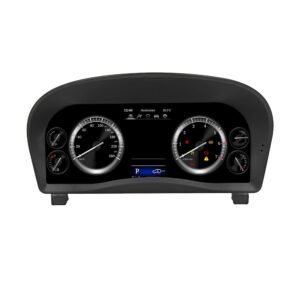
Main Product Front View
This front product view shows the LC200 digital cluster body and screen layout before installation.
Physical Product View Before Installation
Correct physical fitment matters because the display installs in the original LC200 instrument area.
Before and After: Old Cluster to Digital Cockpit
The before-and-after view shows the real upgrade logic: the original gauge area is replaced by a cleaner digital interface that gives the LC200 a newer cockpit feeling.
Fuel, Temperature and Vehicle Information Display
The display can show practical driving information such as fuel, temperature reminders and vehicle status. This is useful for daily driving, long-distance travel and off-road use.
Large 12.3-Inch Dashboard Display
The larger digital interface makes the main driving data easier to read while keeping an OEM-style appearance suitable for the LC200 cabin.
Parameter Settings and Driving Range Information
Maintenance and parameter pages help organize useful information such as tire pressure, driving range and instantaneous fuel consumption when supported by the vehicle configuration.
Classical Mode with New-Style UI Interface
Multiple cool theme styles let the owner choose a dashboard look that feels modern while still keeping a familiar gauge-style driving layout.
Installed Display View from the Driver Seat
This installed view shows how the digital cluster sits in the original driver line of sight, keeping speed and vehicle information easy to read.
Digital Cluster Interface Theme Options
Different UI themes give owners a more personalized dashboard view, from familiar gauge-style layouts to newer virtual cockpit display styles.
Modern Interface for a Premium LC200 Interior
The upgraded instrument display makes the cabin feel more premium, especially on higher-trim LC200 vehicles used for family travel, touring or off-road driving.
Real Product Display in the Vehicle
The display keeps the main driving information centered and easy to scan.
Final Installed Dashboard Fitment View
This close installed view shows the display sitting inside the LC200 instrument area.
Toyota Land Cruiser LC200 Digital Cluster Specifications
Product Type Digital Instrument Cluster / LCD Cluster / Virtual Cockpit Retrofit
Main Supported Vehicle Toyota Land Cruiser LC200 2008–2020
Market Versions Petrol / diesel, GCC, EU, Asia, Australia, New Zealand and Middle East versions prepared after vehicle information check
Screen Size 12.3 inch
Resolution 1920×720
Operating System Linux
App Installation No. This is not an Android head unit.
Display Themes Multiple OEM-style display themes and dashboard layouts
Navigation Prompt Supported when paired with a compatible aftermarket head unit or CarPlay system that supports cluster output
Installation Route Dedicated harness connection with dashboard cluster removal, vehicle configuration and full function testing
Product Weight 2 kg
Package Dimensions 46 × 33 × 25 cm
SKU T1001
Upgrade Decision
Toyota LC200 Cluster vs Repairing the Old Dashboard
If your only goal is to fix one small gauge issue at the lowest possible cost, local repair may be enough. But if you want the LC200 cabin to feel newer, clearer and easier to read, the Motoway Upgrade Toyota LC200 Cluster is the stronger upgrade path.
Keep Old Cluster
Lowest effort if everything still works, but the cabin remains visually dated and information display stays limited.
- No visual upgrade
- No new display layout
- Old dashboard feeling remains
Repair Original Cluster
Useful for restoring a local fault, but it generally brings back the same old factory display experience.
- Restores old function
- No virtual cockpit result
- Still old-generation display style
Used OEM Cluster
A second-hand cluster may solve a hardware failure, but it can bring unknown condition, history and fitment questions.
- Condition varies
- Still old factory style
- Compatibility must be checked
Motoway Upgrade LC200 Digital Cluster
- Modern digital dashboard
- 12.3″ 1920×720 Linux display
- LC200 fitment preparation
- Installation and configuration support
View Current Options
Do Not Force the Installation If These Problems Appear
Connector mismatch
Connector shape or pin layout clearly does not match.
Pin damage
Pins are bent, damaged, loose or cannot connect securely.
Abnormal heat
Stop if there is abnormal heat, smell or smoke.
Power issue
A fuse repeatedly blows or power and ground cannot be confirmed.
Wire cutting required
Do not cut the supported factory main wiring to force installation.
Do not keep testing blindly on an older vehicle wiring system.



Reviews
There are no reviews yet.